Snap a photo of your menu,
go live in minutes
Already have a printed menu? Take a photo of it and we read the sections, items, and prices in one pass. You look over the draft, fix anything, and publish a live menu your customers can scan. No retyping a single dish.
From paper to a QR menu, the short way
Setting up your first menu is usually the slowest part. A photo turns it into a head start you only have to tidy up.
Skip the typing
Instead of keying in every dish and price by hand, you start from a draft we read off your photo. Most of the work is already done before you touch the keyboard.
Live the same day
Photo, quick review, publish. You walk away with a mobile menu and a QR code your customers can scan at the table, not a half-finished setup you'll come back to later.
You stay in control
Nothing goes live until you say so. You see exactly what we read and approve it, so the menu your customers see is the one you signed off on.
We read the whole menu in one pass
Take a photo of your menu, flat or laminated, and upload it. We read the sections, the dishes, the descriptions, and the prices, and lay them out as a draft menu, grouped the way they are on the page.
- Reads sections, items, and prices
- Keeps your descriptions and currency
- Snap with the phone you already have
- Upload several photos for a long menu
Look it over, fix anything, then publish
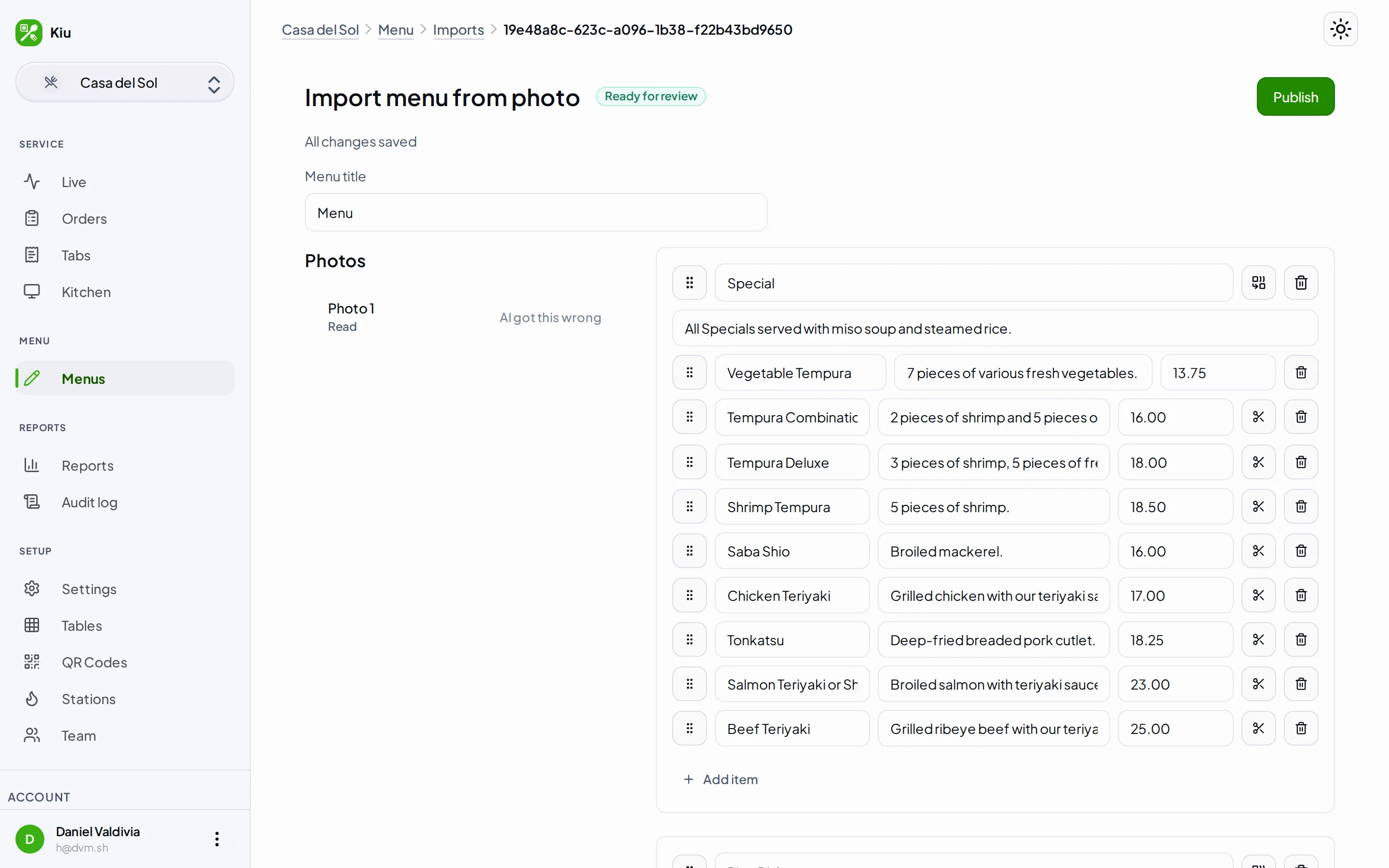
OCR gets you most of the way, not all of it. You land on a review screen with every section and item laid out and editable. Fix a price, rename a dish, reorder or split a section, or add a handwritten special we couldn't catch, then publish when it looks right.
- Edit any name, price, or description
- Reorder, split, or merge sections
- Add anything the photo missed
- Re-run a page if it came out wrong
Works on English and Spanish menus
We read menus in English and in Spanish and keep the words exactly as they are written, accents and all. When you publish, you get a clean, mobile-friendly menu with a QR code your customers can scan, no app to download.
- Reads English and Spanish menus
- Keeps the original wording and accents
- Publishes a phone-friendly menu
- Comes with a scannable QR code
Questions about importing
What can I photograph? +
Is the scan perfect? +
Will my menu go live automatically? +
Does it cost anything to import a menu? +
Get your menu online today
Take a photo, look over the draft, and publish. Your first menu can be live and scannable before your coffee gets cold.